Garlicky Mushroom Stroganoff Orzo
Garlicky mushroom stroganoff orzo50 min
Comparison

Meal Planning Apps With a Shopping List (UK)

Read
6 min
Updated
By
Alex Fahey

Pictured: Garlicky Mushroom Stroganoff Orzo

Short answer

It depends which job you need done. Cherrypick turns your list into a priced basket at Sainsbury's, Tesco or Asda. AnyList is the best shared list for a household. Mealime gives the cleanest aisle-sorted list on a free tier. Chop it is built around merging ingredients from recipes that arrived from different sources.

Contents

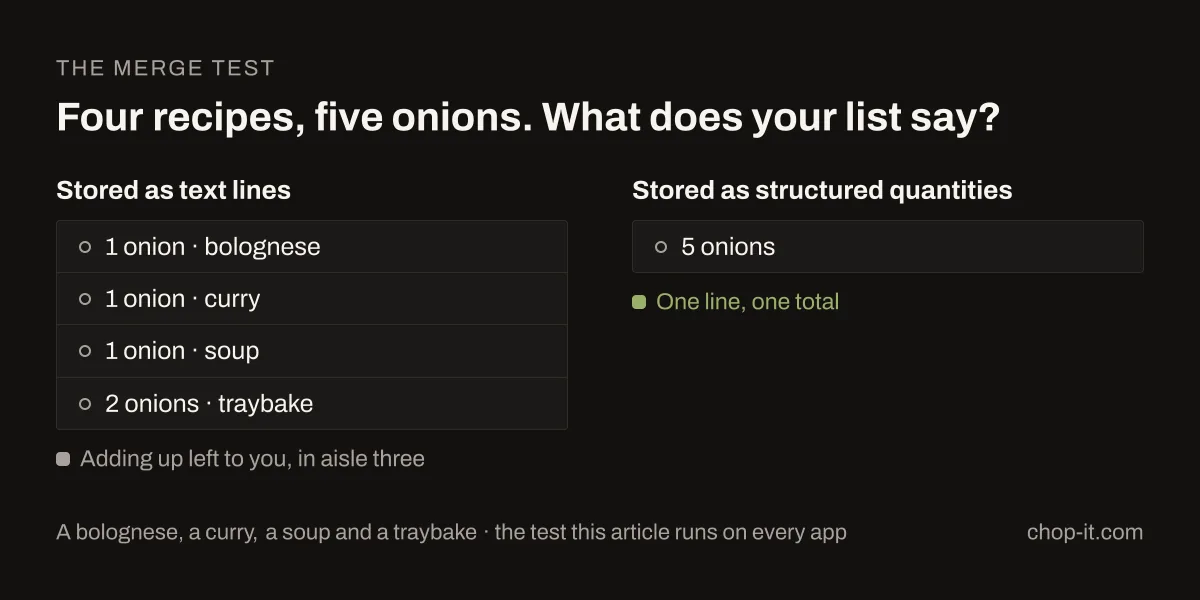
Pick four recipes for the week: a bolognese, a curry, a soup and a traybake. Three of them want an onion and one wants two. Your list should say "5 onions". Plenty of apps say "1 onion", "1 onion", "1 onion", "2 onions" on four separate lines, and leave the adding up to you in aisle three.

Four recipe ingredient lines merged into a single five-onion shopping-list entry

Every app in this category claims a shopping list feature, but they don't do the same thing, and the gap only shows once you're standing in a supermarket. I've gone through the main UK options against the three jobs below. The wider comparison, covering recipes, planning and price, is in the full guide to UK meal planning apps.

The three jobs a shopping list has to do

Merging. Combining the same ingredient across several recipes into one line with the right total. It sounds trivial and it's what most apps do worst, because it means knowing that "1 onion, diced", "1 large onion" and "2 onions, finely sliced" are the same shopping item.

Sorting. Putting the list in the order you walk the shop: produce together, dairy together, freezer last. A list in recipe order sends you back across the store four times.

Pantry awareness. Leaving off what you already own. You have salt and olive oil, and you almost certainly have rice. An app that adds them every week trains you to ignore your own list.

Most apps do one of these well and some do two. Very few do all three.

How each app handles it

Cherrypick

The most complete answer if you shop at one of three supermarkets. Your plan becomes an actual basket at Sainsbury's, Tesco or Asda with real prices, so the merge happens in the basket itself: it holds a priced quantity of onions. You can scan your fridge and cupboard so it skips what you own, the strongest pantry feature in this group.

The catch is the retailer list. Shop at Aldi, Lidl, Morrisons or Waitrose and the main reason to use it is gone. Some features are limited to Sainsbury's.

Price: free tier; Plus £3.49 a month, Pro £6.99 a month.

Chop it

This one is mine. The shopping list was built around merging across the week, so ingredients are stored as structured quantities rather than lines of text, and four recipes wanting onions produce one line with the total. Recipes from a website, a photographed cookbook page, a social video or ChatGPT all merge the same way once they're in.

Anything in your Pantry is left off the list by default. Add what you have by hand, or scan a veg box or delivery with your camera, and plan the week from those ingredients rather than against them. When you're ready to shop, send the list to Whisk for online ordering, or search Tesco, Sainsbury's, Asda, Morrisons, Ocado and Waitrose line by line.

The limitation: it doesn't build a priced basket the way Cherrypick does, and it's newer than most products on this list. The Android app only arrived on 14 October 2026; before that, Android meant the browser or ChatGPT.

Price: free to start, and planning the week is free; Pro £2.99 a month or £24.99 a year, currently discounted to £19.99 for the first year. (Chop it's pricing checked 11 October 2026.)

Mealime

Mealime's list is the cleanest to shop from. It merges properly, sorts by aisle without being asked, and is designed to get you out of the shop quickly. For a straightforward week of quick dinners it's hard to beat, and the free tier covers it.

Where it stops: there's no pantry. It doesn't know what you already own, so oil, stock and staples come back every week and you learn to skim past them.

Price: free; Meal Planner Pro £2.99 a month, the joint cheapest paid tier here with Chop it.

Samsung Food

The most capable free list here. Save recipes from anywhere, drop them onto a week and get a merged list on iOS, Android and a proper web app without paying.

Merging is generally reliable. Pantry handling exists but is lighter than Cherrypick's or Chop it's, and the product has grown broad enough that finding things takes longer than it should.

Price: free core; £6.99 a month or £59.99 a year for premium.

AnyList

The best shared list, which is a different job from the best generated list. Two people can edit the same list at once, in the shop and at home, and it updates immediately. If your problem is coordination rather than compiling the list, nothing else here is close, and £14.99 a year covers the whole household.

Recipes and meal planning feed the list, though they're thinner than in the dedicated planners. No pantry awareness.

Price: free; Complete £9.99 a year individual, £14.99 a year household.

Plan to Eat

A well-organised list grouped by aisle, generated from the nicest calendar in this group. Merging is solid. It suits households cooking from a fixed set of their own recipes rather than discovering new ones.

Before committing, know that there's no free tier after the 14-day trial, and the app was built for a US audience, so some ingredient names and conventions need translating.

Price: £49.99 a year after a 14-day trial.

Paprika 3

Paprika builds a competent list from whatever recipes you've clipped, grouped into categories. The appeal is the payment model rather than the list: £4.99 as a one-off iOS purchase, with other platforms sold separately, which over three years undercuts every subscription here.

No pantry awareness and no supermarket connection. It organises what you bring it.

Price: £4.99 one time on iOS. Desktop apps sold separately.
Which to pick

If your problem isUse
Knowing what the week costs before you buy itCherrypick
Recipes arriving from cookbooks, websites, social and AIChop it
Getting through a shop quickly, for freeMealime
A free list that works on iPhone, Android and webSamsung Food
Two people shopping from one listAnyList
Never paying a subscription againPaprika 3

Two things worth doing whichever app you choose

Check the merge on your first week. Plan four recipes that share an ingredient and look at the list. Within thirty seconds you'll know whether the app combines quantities or lists them separately, and it's better to find out before you've built a habit around it.

Tell it what you already own. In apps with a pantry, ten minutes adding your staples once removes about a third of every list after that. In apps without one, keep a short mental list of the categories you never need to buy and skim past them.

A plan you never shopped for is a nice document. Try the quick weeknight recipes with whichever app you pick and see what its list does with them.

Prices verified on 5 August 2026 from UK App Store listings and in-app subscription screens; Chop it's own prices and features checked on 11 October 2026. Subscription pricing changes often, so check the current listing before buying.

Quick answers

  • Do meal planning apps combine duplicate ingredients?
    The good ones do, but check rather than assume. Plan four recipes that each use onions and see whether the list gives you one line with the total or four separate lines. Apps that store ingredients as structured quantities do this more reliably than apps that store them as text.
  • Is there a free meal planning app with a shopping list?
    Yes. Samsung Food has the strongest free tier, covering saving, planning and a merged list on iOS, Android and web. Mealime's free tier works on its own. AnyList and Cherrypick have free versions, and Chop it is free to start.
  • Can I share a shopping list with my partner?
    Yes. AnyList does it best, with real-time editing for a household at £14.99 a year. Samsung Food supports sharing too. Most other apps here assume one person does the shop.

Keep reading